A tour page of your own
Your space, your photos, your details and your booking button, together on one page.
For studios, stays, shops and listings
Roam turns the photos you already have into a 3D tour people can look around in. Put it next to your booking button or on a listing, or send the link when someone asks what the space is like.
One HD tour is $39, paid once. No subscription.
AI builds the tour from your photos, so you look it over before anyone else sees it.
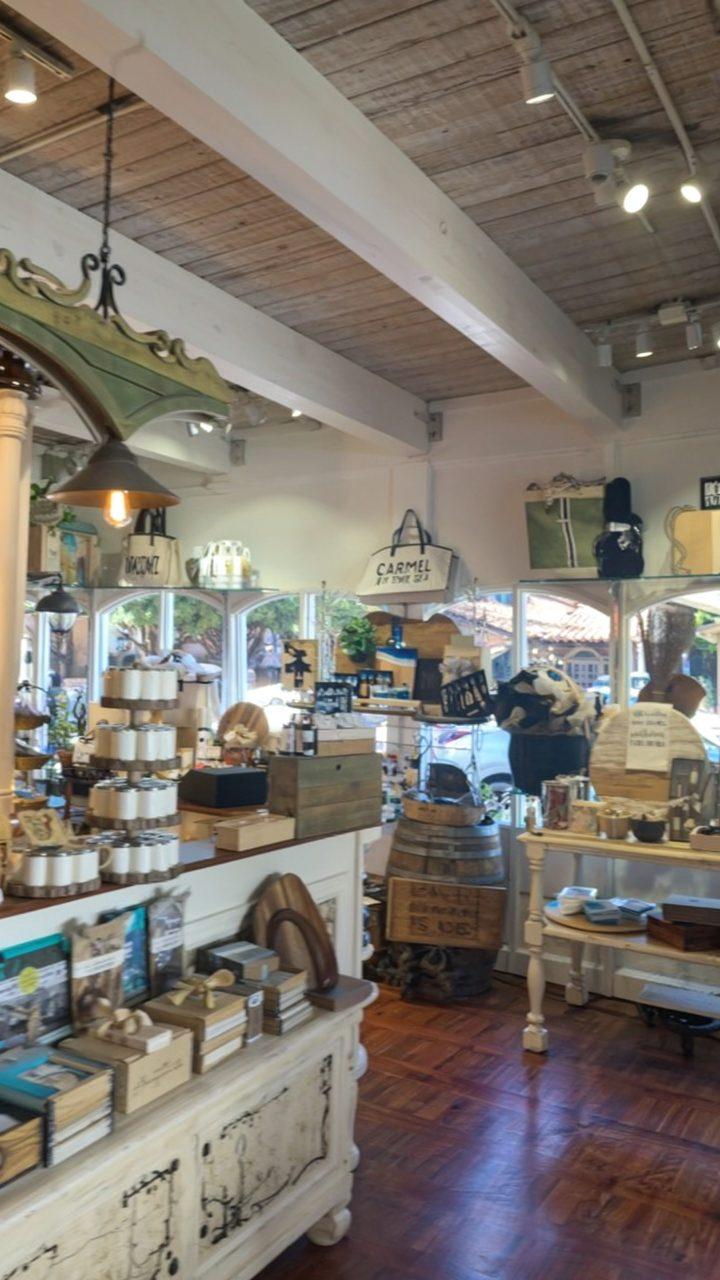
A real gift shop in Carmel, rebuilt from 4 phone panoramas. Watch the walkthrough, then explore in 3D and use “Compare with photos” to check any spot against the original.
01
Several overlapping photos of one room work best. Phone panoramas, a single photo or a short video work too.
02
Verify your email and pay once. Most tours are ready in a few minutes.
03
Look it over next to your photos. Then embed it on your site, send the link or print the QR code.
What comes with every tour
Your space, your photos, your details and your booking button, together on one page.
Paste one snippet next to your rates. Bookings still go through the system you already use.
For your bio, your email replies, a listing or a sign in the window.
Sized for Reels and Stories. Tours made from several photos get a walkthrough that moves between the spots where they were taken.
Visitors can save a photo of an angle they like, or send a link that opens the tour right there.
Made from several photos? Visitors can stand where any photo was taken and slide between the photo and the 3D.
Give every room a place to be seen
Roam is for the room people want to see before they commit: a studio before a session, a room before a stay, a shop before a visit, a home before a showing.
Straight answers about the AI
The layout, the light, how one corner leads to the next. The things a few photos rarely answer, and the reason people ask to see more.
With several photos, the tour is rebuilt from them and visitors can check it against each one. From a single photo or a video, AI imagines the rest, so details can differ. Look it over before you share. It’s not a measured scan.
Your photos. Your choice of help.
Pay per tour. No subscription required.
$39
One HD generation · one-time payment
Create it yourself. Includes the hosted tour page, website embed, share link, QR code and a portrait video for social.
Create my tour$149
One room · scope confirmed before payment
Send us the room photos. We create and review one finished HD room tour, then help you get the embed and share assets ready to use.
Ask us to create it$500
One booking-focused page · agreed kickoff
One polished landing page or microsite, one HD tour, embed and share link, three social-ready creative assets or orbit clips, a clear booking CTA and basic analytics.
Discuss a booking pageMore rooms to share? Studio membership: $149/month for 10 HD generations and white-label tour pages. Cancel future renewals anytime.
Need a full multi-page website? That’s a separate custom engagement, quoted above the $500 booking-page package.
Each HD tour is one generation. The included video is rendered by AI from your tour, not filmed. For service packages, we confirm the scope and kickoff date before you pay.
Tell Michael about your room. We’ll confirm the scope, source photos and availability before you pay. The 48-hour turnaround begins at the agreed kickoff, after we have your assets and booking link.
Prefer email? micky@strikingventures.com
Several overlapping photos of one room, in even light, give the most faithful tour, because Roam rebuilds the room from them. Phone panoramas work too: take one from 3 or 4 spots a few steps apart. One photo, a true 360° panorama or a short walkthrough video also work, but then Roam fills in what the camera didn’t see. Keep each room in its own tour.
From several photos, the tour is built from what they show, and visitors can check any spot against the original photo. Corners no photo covered can look soft. From one photo or a video, AI may change furniture, equipment, signs and room geometry. Either way it isn’t a measured floorplan, an acoustic assessment or a replacement for a site visit.
No. Add your existing booking link to the tour page, or embed the tour on your own website. Your rates, availability and booking system stay where they are.
Yes. Email Michael for help choosing room photos or embedding a tour. Hands-on rendering and custom setup are quoted separately before work begins.
You already have the photos. See what they can become.
Create my tour ↗Showing a different kind of space? Roam works for other spaces too.